


Blog / 2026 GMC Terrain

2026 GMC Terrain Technology: New Features and Standard Tech Explained

7bce2699-21a4-4af5-8843-b2ea00cf7dad_c401ce9f-64e7-4748-981b-db47490ef9a8_Prev

The Terrain received big upgrades from the previous generation.

Especially in the technology department.

But GMC did more than increase the screen sizes.

Let’s take a closer look at the features that make the Terrain stand out.

Large Infotainment Display
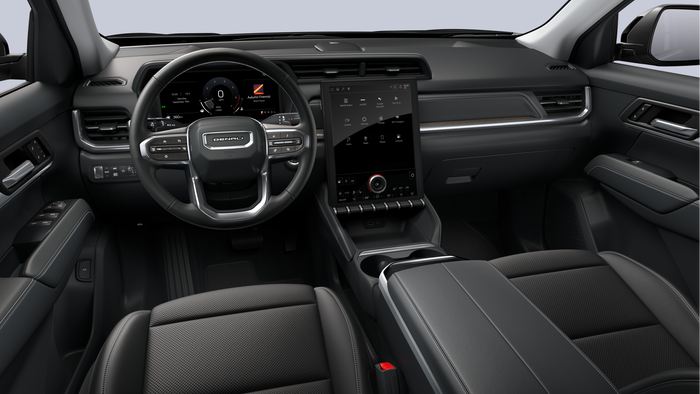
2026 GMC Terrain interior featuring digital driver display, large vertical touchscreen infotainment system, and modern SUV dashboard layout.

The new screen is larger, and stands upright. This makes getting to navigation, music, and vehicle settings easier.

You get:

  • clear menus
  • quick controls
  • easy navigation access

Digital Driver Display

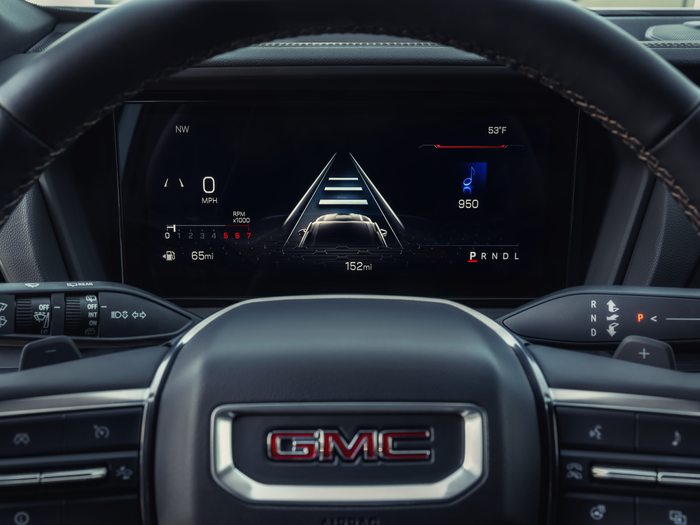
The Terrain also includes an 11-inch digital driver information center.

This screen replaces traditional gauges and shows helpful information like:

  • navigation directions
  • safety alerts
  • important vehicle data

Google Built-In Technology

This allows drivers to use:

  • Google Maps navigation
  • Google Assistant voice commands
  • downloadable apps

You can use these with or without a Google account.

Wireless Smartphone Charging

The Terrain offers available wireless charging for compatible phones.

This means fewer cords, and more charging spots for other devices.

Advanced Camera Views

Some Terrain models include up to eight available camera views.

These cameras help drivers:

  • with parking
  • see obstacles around the vehicle
  • improve visibility in tight spaces

Browse Available Terrain Inventory

Find out how much you can save on available 2026 GMC Terrains here.
Posted in:

Related Posts

COMPLETE

The Complete Buyer’s Guide to the 2026 GMC Terrain

The 2026 GMC Terrain blends comfort, technology, and capability in one easy-to-drive package. This guide will walk you through everything you need to know before buying the new Terrain. Why the 2026 Terrain Is Worth a Look GMC redesigned the Terrain with more features, more technology, and more personality. Now, the Terrain has three distinct trims: Elevation AT4 Denali Each one is designed for a different type of driver. Some buyers want value and everyday comfort. Others want off-road capability or luxury features. The Terrain lineup makes it easy to find the right fit. Terrain Trim Levels Explained Terrain Elevation Elevation is the starting trim, but it comes with a strong list of standard features. Highlights include: Heated front seats Heated steering wheel Adaptive Cruise Control Large 15-inch infotainment screen 11-inch digital driver display Remote start 40/60 folding rear seats This trim is great for buyers who want modern features without stepping into the highest price range. SHOP OUR SELECTION OF 2026 GMC TERRAIN ELEVATIONS'S HERE Terrain AT4 The Terrain AT4 is designed for drivers who want adventure and capability. AT4 adds features like: Standard all-wheel drive Off-road tuned suspension All-terrain tires Lifted ride height Unique drive modes for rough roads Signature red recovery hooks The AT4 has every standard feature of the Elevation. Plus, more features for camping trips, gravel roads, or winter driving. The AT4 is made for those needing a more capable SUV. SHOP OUR SELECTION OF 2026 GMC TERRAIN AT4'S HERE Terrain Denali Denali is the luxury version of the Terrain. Key upgrades include: Leather seating Heated and ventilated front seats Heated rear seats HD Surround Vision cameras Premium interior materials Unique Denali styling The Denali is one another level compared to the previous trims. This trim focuses on comfort and providing a full luxury experience. SHOP OUR SELECTION OF 2026 GMC TERRAIN DENALI'S HERE Interior Technology The Terrain features one of the most modern interiors in the small SUV segment. Key highlights include: 15-inch portrait infotainment screen 11-inch digital driver display Available Google built-in services Wireless smartphone charging Large camera system for visibility These features make daily driving easier and more enjoyable. Cargo Space and Practicality A small SUV needs to be practical for real life. The Terrain offers flexible cargo space and smart storage solutions. Features include: Folding rear seats Hidden cargo storage Pass-through storage under the center console Up to 63.5 cubic feet of cargo space This makes it easy to carry groceries, luggage, or sports gear. Safety and Driver Assistance The Terrain comes standard with 15 safety including but not limited to: Forward Collision Alert Automatic Emergency Braking Lane Keep Assist Rear Cross Traffic Braking Blind Zone Steering Assist Rear Park Assist These systems work together to help prevent accidents and make driving less stressful. Who Should Buy the Terrain? The Terrain is a great fit for many drivers. It works well for: commuters who want comfort and tech outdoor drivers who like light adventure buyers who want luxury features without a luxury price Shop GMC Terrain Inventory Which one is right for you? The best way to decide is to see one in person. Browse our available GMC Terrain inventory to explore current models, trims, and features.

How to Turn On Rain-Sensing Wipers in the 2026 GMC Yukon

How to Turn On Rain-Sensing Wipers in the 2026 GMC Yukon

How to Turn On Rain-Sensing Wipers in the 2026 GMC Yukon Rainy weather can make driving more demanding, especially when the amount of rainfall keeps changing. The 2026 GMC Yukon offers available rain-sensing windshield wipers, designed to help drivers maintain a clear view of the road without constantly adjusting their wiper speed. This convenient feature uses a sensor to detect moisture on the windshield and automatically responds when rain is detected. How to Enable Rain Sense Wipers On a properly equipped 2026 GMC Yukon or Yukon XL, you can enable the feature using the center touchscreen. Follow these five steps: Open Settings. Locate the Settings icon on your GMC Yukon's infotainment screen. Select Vehicle. Open the menu containing your vehicle's customizable settings. Choose Comfort and Convenience. Find this option in the Vehicle settings menu. Find Rain Sense Wipers. Scroll down until the Rain Sense Wipers setting appears. Turn It On. Enable the setting to allow the rain-sensing function. Once enabled, the system can automatically respond to changing rainfall when the windshield wiper controls are set to the appropriate operating mode. What Do Rain-Sensing Wipers Do? Instead of requiring you to adjust the wipers every time the rain changes, the system can automatically control wiping frequency based on the moisture detected on the windshield. Some practical benefits include: Light rain: The system can respond to small amounts of moisture. Changing conditions: Wiping frequency can adjust as rainfall increases or decreases. Convenience: Spend less time manually adjusting the windshield wipers. Always make sure your windshield is clear and your wipers are operating properly. Drivers should still adjust the controls manually when conditions require it. Discover More GMC Yukon Features Rain-sensing wipers are just one of the many available convenience features in the 2026 GMC Yukon and Yukon XL. At Dave Sinclair Buick GMC in St. Louis, our team can help you explore the vehicle's technology, comfort features, and customizable settings. Browse our current GMC Yukon inventory to learn more about the models and features available at our dealership.

How to Enable Automatic Folding Mirrors on the 2026 GMC Yukon

How to Enable Automatic Folding Mirrors on the 2026 GMC Yukon

The 2026 GMC Yukon offers several convenient features that can make everyday driving easier. One of them is Remote Mirror Folding, which allows the side mirrors to automatically fold when you lock your vehicle. This feature can be especially useful when parking in a garage, navigating tight parking spaces, or leaving your Yukon in a crowded parking lot. How to Enable Remote Mirror Folding If your GMC Yukon is equipped with power-folding mirrors, follow these steps using the center touchscreen: Open Settings. Tap the Settings icon on your Yukon's infotainment screen. Select Vehicle. Find and open the Vehicle settings menu. Choose Comfort and Convenience. This menu contains several customizable vehicle features. Find Remote Mirror Folding. Scroll until you see the Remote Mirror Folding setting. Turn It On. Select the toggle to enable the feature. Once enabled, your Yukon's mirrors can automatically fold when you lock the vehicle and unfold when you unlock it. Why Use Automatic Folding Mirrors? The feature offers a few everyday benefits: Tight parking spaces: Folded mirrors reduce how far the mirrors extend from the vehicle. Garage parking: Helpful when parking in a garage with limited side clearance. Everyday convenience: No need to manually fold the mirrors each time you park. Keep in mind that this feature requires the appropriate vehicle equipment. Operation may also depend on how the mirrors were previously folded. Learn More About Your GMC Yukon The 2026 GMC Yukon and Yukon XL include several customizable features designed to make daily driving more convenient. At Dave Sinclair Buick GMC in St. Louis, we enjoy helping drivers understand and get more out of their vehicles. Explore our latest GMC Yukon and Yukon XL models, or contact our team to learn more about the features available on individual vehicles.